
Admin Info
EN | Administrator Guide for Configuring the UPPS! Extension Links Synchronizer (LS)
Overview
Who is this documentation for?
This documentation is intended for system or project administrators responsible for configuring the UPPS! Extension Links Synchronizer (LS).
Prerequisites
Before reading this documentation, you should be familiar with basic Polarion project administration.
What you will learn
After reading this documentation, you will be able to active, and configure the behaviour of the Links Synchronizer for specific projects individually.
Overview of Links Synchronizer
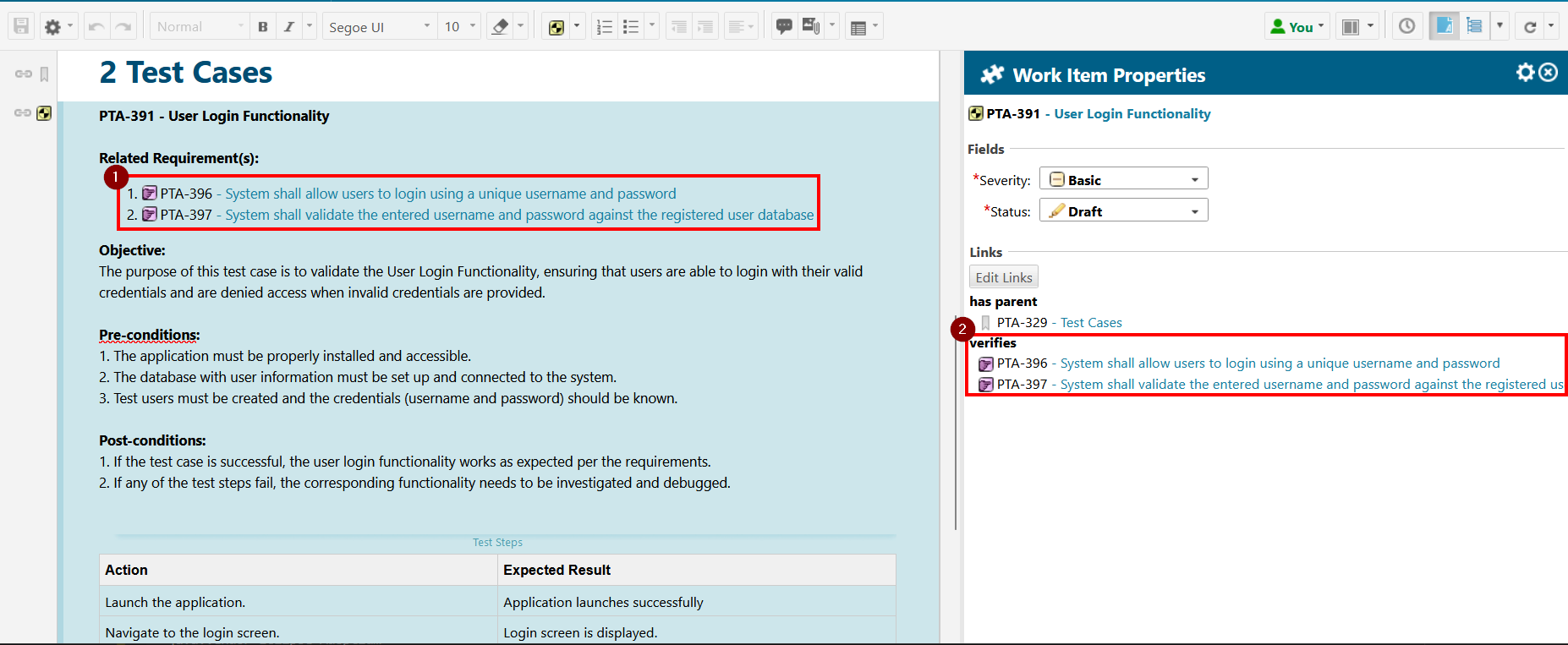
The Links Synchronizer automatically manages Work Item links. It scans the description of a Work Item being saved and ensures that any Work Items referenced via a Polarion Cross-Reference, Polarion Live Link, or Hyperlink receive a corresponding Work Item link, according to a predefined configuration.
Configuration
Introduction
The Links Synchronizer can be configured using either of the following two options:
- Configuration page — accessible in each Polarion project, this lets you specify how the extension should behave for that project. Once configured, the link roles of every Work Item saved in that project are automatically managed according to the configuration.
- Polarion job — applies the configuration across all projects for which the extension is enabled. Use this primarily to synchronize existing Work Items whose link roles have not yet been processed, or after making changes to the Links Synchronizer configuration.
It is strongly recommended that you test this feature in a non-production environment before using it in production. The extension adds and removes link roles across multiple work items, potentially spanning different projects, depending on how the work items are linked and how the extension is configured.
Configuration via Configuration Page
Access the Configuration Page
The Links Synchronizer is configured separately for each Polarion project. Administration permission is required.
- Click the Administration button, navigate to the UPPS! Extensions entry, and open the drop-down menu.
- Click Links Synchronizer to open the configuration page.


At the top of the configuration page you will find the following options:

Note: Saving the configuration by clicking SAVE CONFIGURATION has no effect on your Polarion project until you check the Enable extension for this Project checkbox.
Extra Fields Config
This section contains settings that control the extension's behavior based on the configuration and content of a Work Item.

Include references in TestSteps of WorkItems
Enabling this option causes the extension to scan the Test Steps field for Work Item references in addition to the description field.
Enabling this option may significantly impact the performance of the Links Synchronizer job, as Test Step content is processed at the Java level, which is considerably slower than SQL processing.
Include references in resolved WorkItems
By default, resolved Work Items are not processed. Enabling this option causes the extension to scan for Work Item references in Work Items configured with a direct link rule and set the appropriate link role even if the Work Item is resolved (i.e., has a resolution value set).
Note: For performance reasons, permissions to modify Work Item links are not checked when this option is enabled. Only enable this if you permit Work Item links to be modified on resolved Work Items.
Include references to resolved target WorkItems with backling configurtions
By default, resolved Work Items are not processed. Enabling this option causes the extension to scan for Work Item references in Work Items configured with a backlink rule and set the link role on the referenced Work Item even if it is resolved (i.e., has a resolution value set).
Note: For performance reasons, permissions to modify Work Item links are not checked when this option is enabled. Only enable this if you permit Work Item links to be modified on resolved Work Items.
Extra Backlink Config
Backlink Revision Action
Polarion links can reference a specific revision of a target Work Item in a direct link, but this is not possible with a backlink. If a reference including a revision is added to a source Work Item's description and a backlink rule applies, you must define how the Links Synchronizer should handle this case.
 Fallback

All Types
A general configuration used to apply link rules to any referenced Work Item in a description. The rules defined here are applied when no type-specific configuration exists for the Work Item being evaluated, or when no type-specific filter could be applied.
Typed Configuration
A type-specific configuration used to apply link rules to referenced Work Items in a description. These rules are only applied when a type-specific configuration exists for the Work Item being evaluated and a matching type-specific filter applies.

Rule
A rule defines which link role should be used under which conditions. Each rule specifies a link role, a target project, and optionally target Work Item types on the left side. Target Work Item types can be left empty if the target type is not relevant. The reference data types for which the link role applies are specified on the right side of the rule.
Rule Priority
The number on the left side of each rule indicates the order in which rules are evaluated when matching a Work Item reference. A lower number means higher priority. You can reorder rules using the up and down buttons to move a rule above or below its neighbor.
Type Fallback
This configuration checks the "All Types" configuration as a fallback option. If it is not active, nothing is done if no rule applies, or links are removed that would otherwise match an "All Types" configuration.

Reserved Link Roles
This section lists the link roles used exclusively by the Links Synchronizer. All link roles listed here — whether set automatically or manually — are matched against Work Items referenced in the description of any Work Item in the current project, and handled according to the configured rules. Depending on whether a matching filter applies, the link will be set, removed, or updated.
Only assign link roles here that are used exclusively by the Links Synchronizer. Links are automatically removed when the corresponding reference is no longer present in a Work Item description.
Reference Data Type
Polarion supports the following reference types for embedding Work Items in a description:
Cross-References Special Polarion links used to navigate to a referenced Work Item within a LiveDoc. Identifiable by a dashed underline, they can display the outline number, type icon, ID, or title of the referenced Work Item, with an optional custom label. Clicking one shifts the LiveDoc view to the position of the referenced Work Item.
Live Links Special Polarion links used to reference any Work Item within a Polarion repository. They can display the type icon, ID, or title of the referenced Work Item, with an optional custom label. Clicking one opens the Work Item in the Tracker view.
Hyperlinks Standard hyperlinks displayed with their URL or an optional custom label. For the Links Synchronizer to process a hyperlink, its URL must match the base.url value in the polarion.properties configuration — that is, it must point to the same Polarion server. Clicking one opens the URL in the same or a new browser tab.
Backlink

When a backlink rule applies, the link is set on the referenced Work Item rather than the one containing the reference in its description.
Be aware of the following considerations when using backlinks:
- If the link on the referenced Work Item is deleted manually, the source Work Item cannot detect this change, and the link will remain missing. Regular execution of the LS job is recommended to keep backlinks in sync.
- If the referenced Work Item belongs to a different project, conflicts may arise between the LS configurations of the two projects.
- Users with different permissions across projects may encounter issues reading or writing Work Items involved in backlinks.
- Revision-specific references are not supported for backlinks and will not be created by the extension, as this would result in an invalid state.
Caution: The following are known limitations of the Links Synchronizer. Some are not implemented due to technical constraints; others may cause significant performance impact.
No cross-project configuration validation There is no validation between the Links Synchronizer configurations of different projects. This means a rule in one project may conflict with a rule in another — for example, one project may create a link that the other project's configuration attempts to delete. Review configurations across projects carefully when Work Items are linked across project boundaries.
Missing read permissions on target Work Items If a user does not have permission to read a target Work Item, the Links Synchronizer cannot retrieve the information needed (such as Work Item type) to determine whether a link should be set or removed. References and links to unreadable Work Items are skipped.
Missing or invalid target Work Items If a target Work Item referenced in a description does not exist, it is treated the same as a missing-permission case (see above) and skipped.
Configuration via Polarion Job
Configure the Job
Add the following scheduler job configuration via Global Administration > Scheduler and configure it as needed.
  <!--
    Processes workitems in all projects with an enabled UPPS!E Links Synchronizer configuration
    to ensure that the workitem links align with the Links Synchronizer configuration.

    Properties:
      - userVaultKey:
          The key identifying a user account in the Polarion user account vault.
          The job will then execute as the specified user.
          Ensure that this user has permission to modify workitems in all projects.

          Possible values: Key of a user specified in the User Account Vault
          Optional: If the job is executed manually through the Polarion Monitor interface.
          Required: If the job is executed automatically via cron-job.

      - batchSize:
          The number of workitems that will be processed before a commit to the svn repository will occur.
          Due to technical circumstances, committing a large amount of changes may render the system unstable or unusable.
          A batch size is therefore specified that will divide workitems changed by the Links Synchronizer into commit groups
          up to a maximum of ${batchSize} workitems.

          Possible values: Any integer greater than 0
          Optional: Default value is 500 workitems.

      - showUpdatedWorkItems:
          Specify whether to explicitly list all workitems in the job log by their id that were updated.
          The job log will print a lucene query with all updated workitems so that you can list them in the workitem tracker.

          Possible values: true or false
          Optional: Default value is false.
  -->
  <job
      disabled="true"
      id="upps.links.synchronizer.job"
      name="UPPS!E Links Synchronizer: Ensure sync"
      scope="system">
      <!-- <userVaultKey></userVaultKey> -->
      <!-- <batchSize>500</batchSize> -->
      <!-- <showUpdatedWorkItems>false</showUpdatedWorkItems> -->
  </job>
Starting the Job
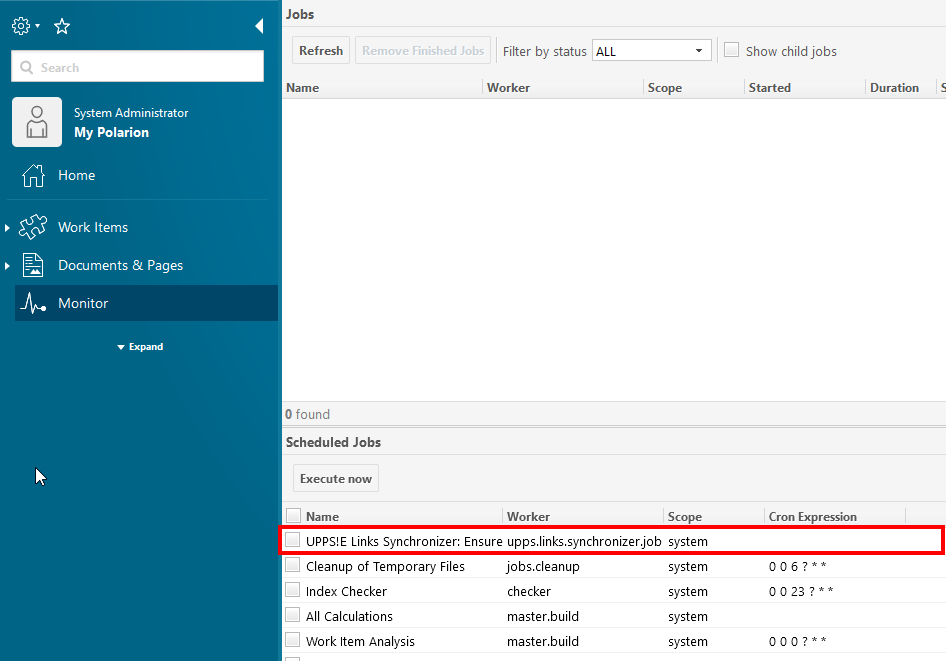
Once you have configured the Links Synchronizer job, it appears as an entry in the Monitor.
Start the LS job by checking the box next to it (1), then clicking Execute now (2). You can refresh the job view (3) to check the current status. For detailed information about the job process, view the log (4).
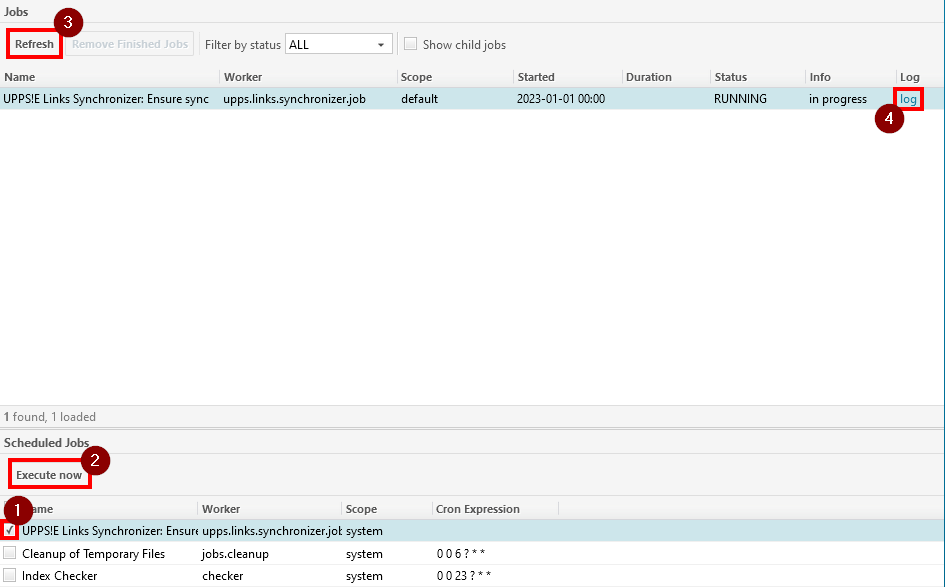
If the userVaultKey job property is not configured, the job runs as your currently logged-in user. Work item changes and the permissions required to make them are evaluated based on your user account and your permissions in each project.
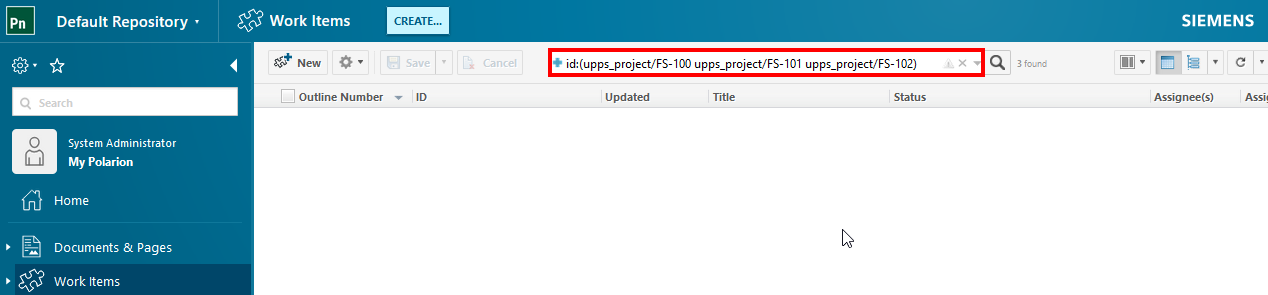
After the job completes successfully, you can review the updated work items if the showUpdatedWorkItems property is enabled. If any work items were updated, the job log will contain the following entry:
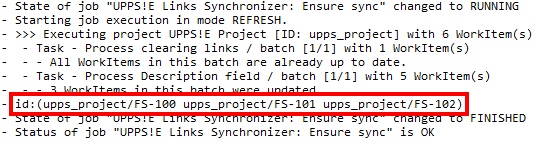 This is a Lucene query that you can paste into the Polarion work item tracker search to list the updated work items in detail.
Keine Kommentare vorhanden
Keine Kommentare vorhanden