
Admin Inf
EN | Administrator Guide for Configuring the UPPS! Extension WorkItem Hider (WH)
Overview
Who this guide is this documentation for?for
This documentation is intended for system or project administrators responsible for configuring the UPPS! WorkItem Hider (WH). in Polarion.
Prerequisites
Before reading this documentation, you should be familiarFamiliarity with basic Polarion project administration.administration is required before following this guide.
What you will learn
After readingcompleting this documentation,guide, you will be able to configure the behavior and functionality of the WorkItem Hider for specificindividual projectsPolarion individually.projects, including defining which Work Items can be hidden.
Introduction
Documentation is most effective when it is available directly at the point of use. In Polarion, document templates often include help or comment Work Items that guide users when creating or editing Work Items in derived documents.
However, whenWhen a document is created from such a template, these help/help and comment Work Items appear alongside the actual Workcontent.
In documents with extensive guidance, this can clutter the structure and reduce readability. Deleting thehelp help/or comment Work Items improves the overview,clarity, but doing so too early may remove valuable guidance that is still needed later.needed.
The WorkItem Hider solves this problem by allowingletting you show or hide help and comment Work Items toon bedemand shown or hidden as needed,— without deleting them.
InstructionsConfiguration
Scope
The WorkItem Hider can only be activated and configured by an administrator, and only at the project level.
Step 1: Open the Configuration Page
To access the WorkItem Hider configuration for configurationa
Configurationproject:
scope
- Open the Polarion administration area for the relevant project.
- In the navigation sidebar, go to UPPS! Extensions.
- Select WorkItem Hider from the menu.
TBD
SpecifyStep 2: Define the Hideable WorkI temsItems Query
HereThe you can define a query that identifies allHideable WorkItems consideredQuery hideable.field Thesedetermines which Work Items are eligible to be hidden. Work Items matching this query will be indicated by a menuHide/Unhide icon in the LiveDoc Editor view of the corresponding LiveDoc. In the editor, you can hide a WorkItem by left-clicking the icon, or open additional actions by right-clicking it.
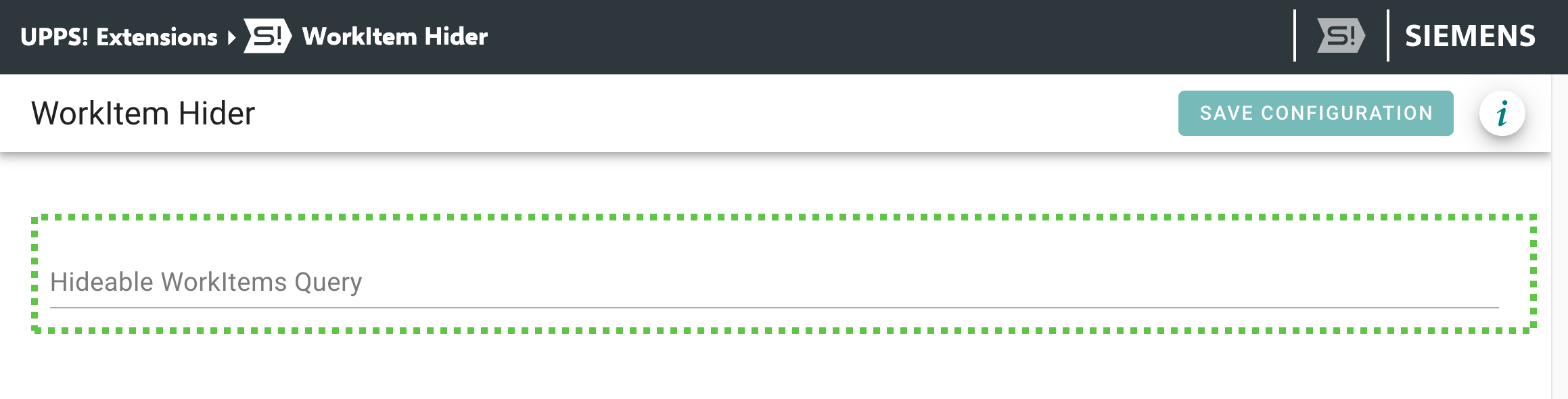 The field accepts any
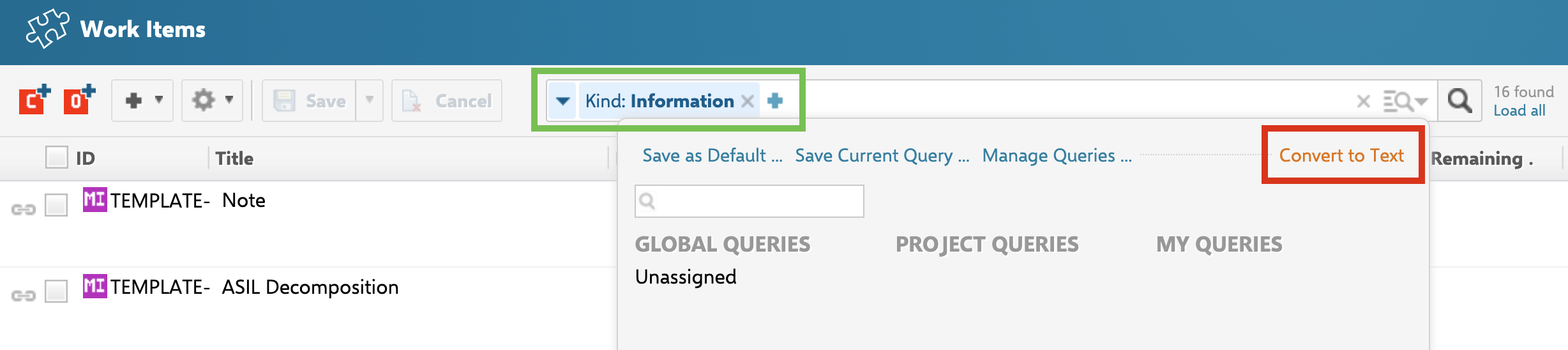
 WorkItemWork Item query that can be created in the WorkItem Tracker. To obtain the query text, create your query in the WorkItemPolarion Query Builder. ThenTo clickset up the query:
- Open the WorkItem Query Builder and build your desired query
- Click the small caret (
triangle)▾) at the right end of the input field to open the contextmenu,menu. - Select
selectConvert to Text in the upper-rightcorner.corner of the context menu. - Copy the resulting text and paste it into the
field above to define whichHideable WorkItemscanQuerybefield.
Only Work Items matched by this query will display the Hide/Unhide icon in LiveDoc Editor. Work Items not matched by the query remain unaffected.